Simplify your payment management by enabling automatic processing of bank statements and notifications in Fakturácia.
✅ What does it do?
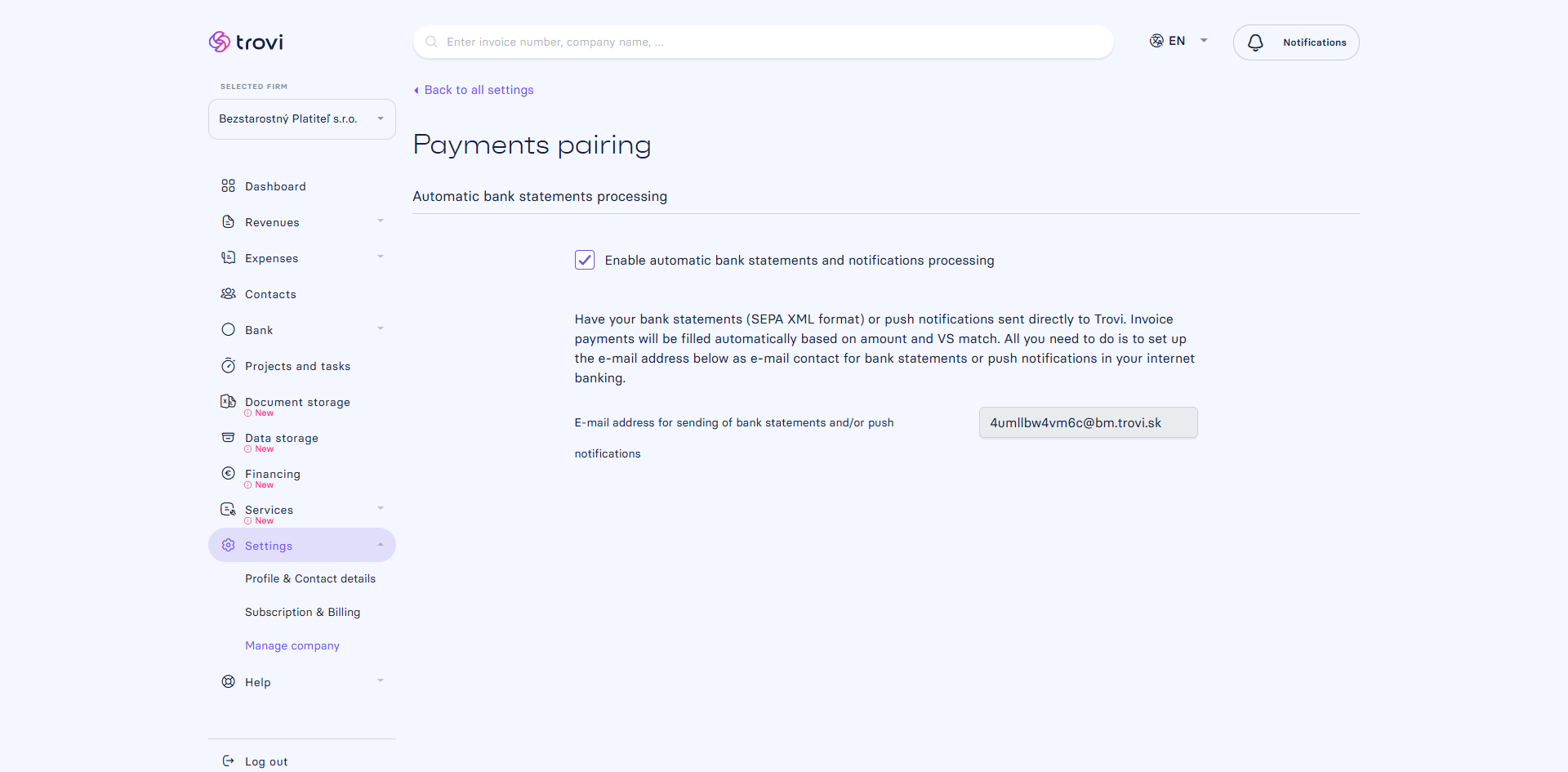
When you set up your internet banking to send SEPA XML statements or payment notifications directly to Fakturácia, the system automatically matches payments to invoices based on the amount and variable symbol.
- All payments are added to the system automatically – no manual entry needed
- Matching works for all bank accounts added under your company
- Save time and always have an up-to-date overview of your payments
🔧 How to activate it?
- Open your internet or mobile banking
- Set up automated sending of statements or payment notifications to the e-mail address generated in Fakturácia
- You’ll find this address in:
Settings → Manage company → Payments pairing
📩 Example of the e-mail address: 4umllbw4vm6c@bm.fakturacia.sk
⚠️ Important: Always copy the address from your own Fakturácia interface – it is unique for each company.
📝 This article was translated with AI. If you notice any inconsistency, feel free to let us know.